 KulaQuest Wiki
TGI Format
A custom binary format for storing theme assets.
This format is still under heavy research!
Overview
This format is used for storing theme-specific assets:
- Block and skybox textures
- Fog and lighting effects
- Bonus skybox
There is a TGI file for each theme in their respective folders, and it is loaded upon entry of a new world. All values are in little endian, and the following primitive types will be used throughout this document:
| Encoding | Description |
|---|---|
| i16 | Signed 16-bit integer |
| i32 | Signed 32-bit integer |
Structure
| Offset(h) | Size | Type | Description |
|---|---|---|---|
| 0x0000 | 400 | Header | Header |
| 0x0190 | 14256 | i16[24 * 99 * 3] | Mipmap CLUT Index |
| 0x3940 | 2048 | i16[1024] | Model Fog Index |
| 0x4140 | 2048 | i16[1024] | Unknown Table |
| 0x4940 | 2048 | i16[1024] | Model Fog Index (Bonus Level) |
| 0x5140 | 2048 | i16[1024] | Unknown Table (Bonus Level) |
| 0x5940 | 476 | ? | ? |
| 0x5B1C | 17080 | ? | ? |
| 0x9DD4 | ... | ? | Bonus Skybox Colors and Rotation |
| ... | 33312 | TIM | Bonus Skybox TIM Texture |
| ... | 225224 | Skybox | Skybox Data |
| ... | ... | ? | Tileset CLUTs and Textures |
Header
| Offset(h) | Size | Type | Description |
|---|---|---|---|
| +0x000 | 132 | LightingConfig | Normal and Hidden level |
| +0x084 | 132 | LightingConfig | Bonus level |
| +0x108 | 4 | i32 | Mipmap CLUT Index Size (99) |
| +0x10C | 4 | i32 | Skybox Flag (1025) |
| +0x110 | 28 | i32[7] | LOD Distance |
| +0x12C | 24 | i32[6] | Block Tile CLUT Indices |
| +0x144 | 4 | i32 | Random Block Tile Rotation |
| +0x148 | 4 | i32 | _unk1 (0) |
| +0x14C | 4 | i32 | _unk2 (0) |
| +0x150 | 4 | i32 | _unk3 (7) |
| +0x154 | 4 | i32 | Plain Tile Texture Variants Count (4) |
| +0x158 | 4 | i32 | _unk4 (50) |
| +0x15C | 4 | i32 | Plain Tile Texture Variants Bonus Count (1) |
| +0x160 | 4 | i32 | _unk5 (50) |
| +0x164 | 4 | i32 | Mipmap CLUT Index Length |
| +0x168 | 4 | i32 | Model Fog Index Length |
| +0x16C | 4 | i32 | Unknown Table Length |
| +0x170 | 4 | i32 | Unknown Table Length |
| +0x174 | 4 | i32 | Unknown Table Length |
| +0x178 | 4 | i32 | Unknown Section Length |
| +0x17C | 4 | i32 | Bonus Skybox Colors and Rotation Length |
| +0x180 | 4 | i32 | Unknown Section Length |
| +0x184 | 4 | i32 | Bonus Skybox TIM Texture Length |
| +0x188 | 4 | i32 | Skybox Data Length |
| +0x18C | 4 | i32 | Tileset CLUTs and Textures Length |
The header has a fixed size of 0x190 bytes, and includes information for various flags, brightness values, and offsets to the file.
The first two values in the header contain a configuration structure for modifying various lighting channels to simulate directional lighting, with the first config applying to normal and hidden levels, and the second applying to bonus levels.
Lighting Channel Modifiers
| Offset(h) | Size | Type | Description |
|---|---|---|---|
| +0x00 | 12 | RGB | Background Color |
| +0x0C | 12 | RGB | Model Color Far Multiplier |
| +0x18 | 12 | RGB | Model Color Dark |
| +0x24 | 12 | RGB | Model Color Neutral |
| +0x30 | 12 | RGB | Model Color Light |
| +0x3C | 72 | BlockLightingColors | Block Lighting |
| Offset(h) | Size | Type | Description |
|---|---|---|---|
| +0x00 | 4 | i32 | Red |
| +0x04 | 4 | i32 | Green |
| +0x08 | 4 | i32 | Blue |
| Offset(h) | Size | Type | Description |
|---|---|---|---|
| +0x00 | 12 | RGB | Left |
| +0x0C | 12 | RGB | Right |
| +0x18 | 12 | RGB | Forward |
| +0x24 | 12 | RGB | Backward |
| +0x30 | 12 | RGB | Up |
| +0x3C | 12 | RGB | Down |
When the skybox flag is not set to 1025, the background color value is used as a clear color to fill the screen for the background.
Passed in as R, G, B arguments to the SetupDisplay function, if a skybox is set, then the function is called with a completely black hardcoded value.
The model color far multiplier is used as a per-channel multiplier for models that are far away, giving them a slightly different depth-cue color than the level geometry. The 3 model color entries (Dark, Neutral, and Light) after apply a lighting value to models depending on which side of a block they are assigned to:
- Models placed on the side directly facing away from the sun will be darkened.
- Models placed on sides that neither face directly towards or away from the sun will be neutral.
- Models placed on the side directly facing towards the sun will be lightened.
The block lighting structure defines directional lighting colors for all 6 cube faces, used to provide each direction a different tint, simulating directional lighting on the level geometry.
Mipmap CLUT Index
As previously mentioned, there are 24 groups in total for tile textures, with each group containing 3 CLUTs with varying amounts of brightness to simulate directional lighting:
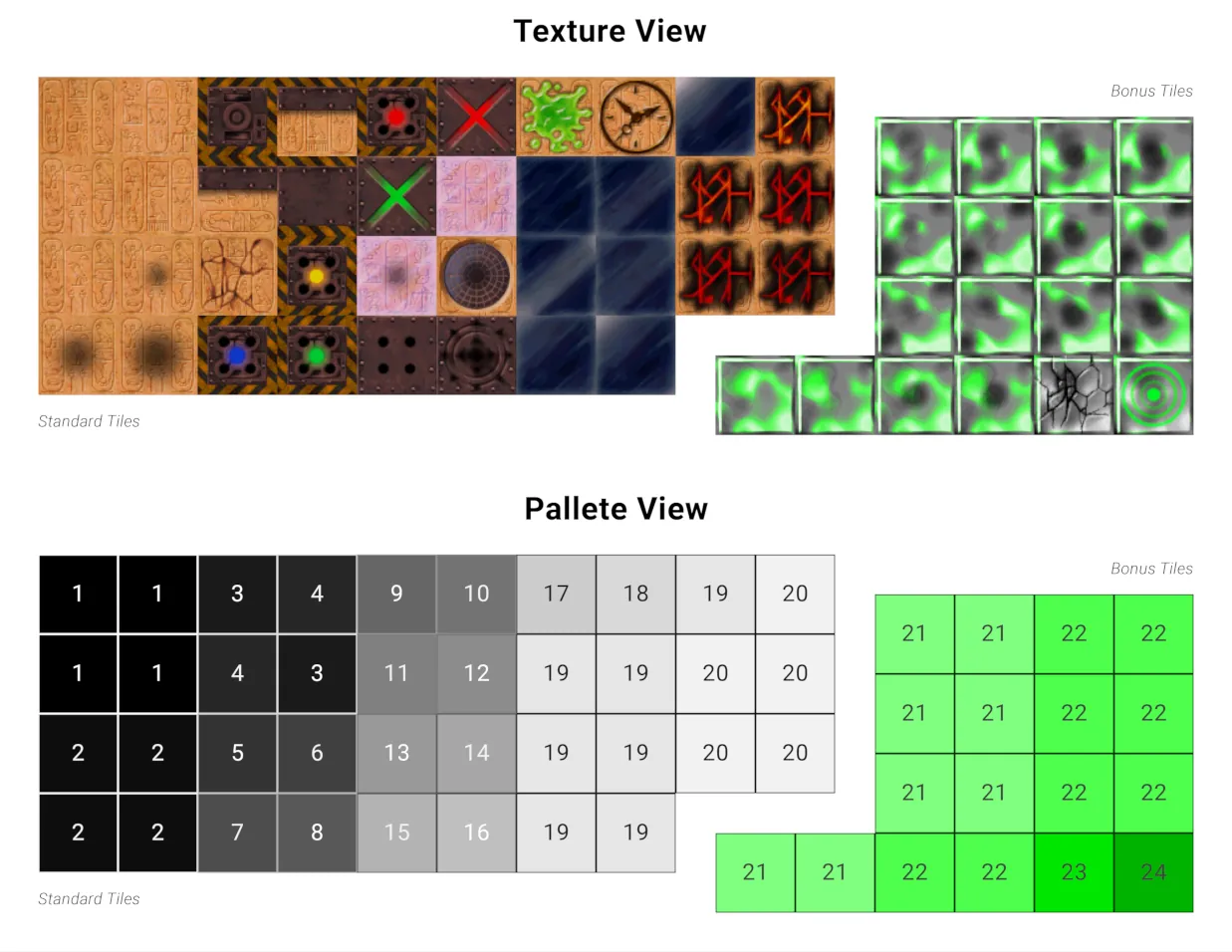
A diagram of the tile texture groups, courtesy of Murphy.
However, there are significantly more CLUTs for mipmap textures, as these CLUTs provide the fog effects when viewing blocks in the levels from a distance. While the 64x64 tiles always have a total of 72 CLUTs, the mipmap textures have varying amounts depending on how much detail is needed to simulate the fog effect. Some tile groups can even have more or less CLUTs than other groups.
This section determines which mipmap CLUTs are used for each mipmap texture, and consists of 72 groups of 99 shorts. Each short value determines which mipmap CLUT is used for a given mipmap texture group, based on how far away the player is from the block.
| Offset(h) | Size | Type | Description |
|---|---|---|---|
| 0x190 | 14256 | MipmapCLUTGroup[24] | CLUT Groups |
| Offset(h) | Size | Type | Description |
|---|---|---|---|
| +0x000 | 198 | i16[99] | CLUT Positions (Dark) |
| +0x0C6 | 198 | i16[99] | CLUT Positions (Neutral) |
| +0x18C | 198 | i16[99] | CLUT Positions (Light) |
The 99 value results from the
Mipmap CLUT Index Sizevalue in the header, so both of these structures will be slightly different for older versions of the game that contained less textures.
The 16 bit values themselves can be decoded into their respective X and Y coordinates for the CLUT they represent in VRAM, in the following manner:
short x = (value & 0x3F) << 4;
short y = value >> 6;
Skybox
The skybox is rendered as a sphere sliced into 24 horizontal bands (latitude, from top to bottom), with each band containing 48 segments per band (longitude, from left to right), resulting in a total of 24 \* 48 = 1152 quads.
Each quad samples a small portion of the packed skybox texture, with one of 24 CLUTs being used for each one.
The following image shows a constructed representation of the skybox from the format:
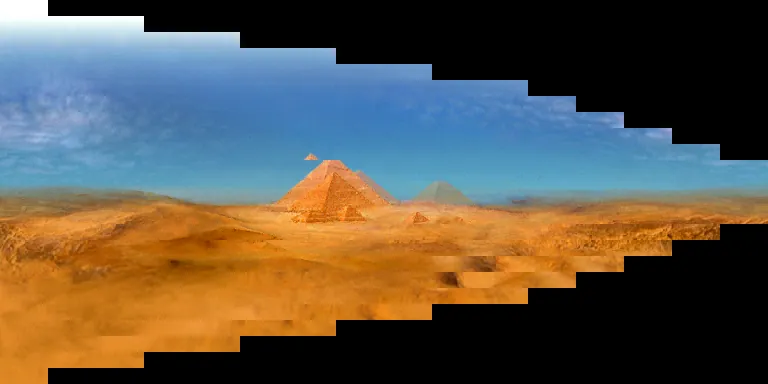
As you can see, since the rings near the poles are physically smaller in size, they don't need as many pixels to represent them, so the game uses fewer texture samples to represent them. Rings near the equater are larger in size, so they get the full-resolution samples. If we stretch every band to the full width of the frame buffer, we get a more accurate representation of the skybox:
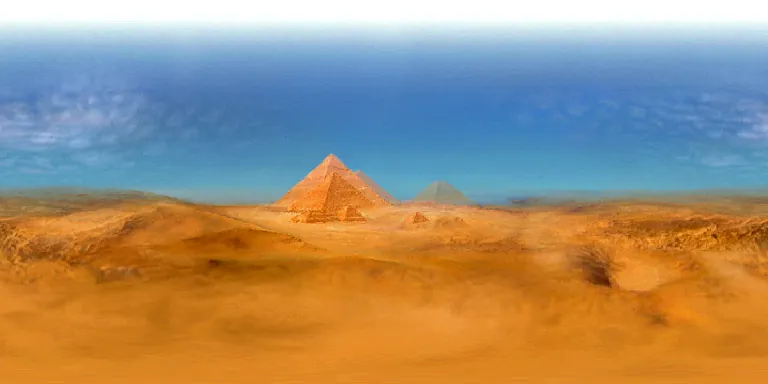
This section determines everything needed to render the skybox, and can be broken up into the following subsections:
| Offset(h) | Size | Type | Description |
|---|---|---|---|
| +0x0000 | 16128 | SkyboxQuadData[1152] | Skybox Quad Data |
| +0x3F00 | 12480 | SkyboxCLUT[24] | Skybox CLUTs |
| +0x6FC0 | 2 | i16 | Skybox Texture X (640) |
| +0x6FC2 | 2 | i16 | Skybox Texture Y (256) |
| +0x6FC4 | 2 | i16 | Skybox Texture Width (Frame Buffer Width) (384) |
| +0x6FC6 | 2 | i16 | Skybox Texture Height (256) |
| +0x6FC8 | 196608 | u8[384 * 256 * 2] | Skybox Texture Data |
CLUTs
There are 24 CLUTs for the skybox, each storing 256 16-bit color values for the skybox texture to index into. The X and Y coordinates determines the location of the CLUT in VRAM, with the width and height being constant; standard for a 256 color palette.
| Offset(h) | Size | Type | Description |
|---|---|---|---|
| +0x00 | 2 | i16 | X (768) |
| +0x02 | 2 | i16 | Y |
| +0x04 | 2 | i16 | Width (256) |
| +0x06 | 2 | i16 | Height (1) |
| +0x08 | 512 | i16[256] | CLUT Data |
Because the skybox texture is 8-bit (CLUT indices), the full panorama is split into regions that each reference their own CLUT, allowing more than 256 colors to be used for the skybox texture. The 24 CLUTs are divided across a 6x4 grid:
- 6 vertical zones, one per group of 4 latitude bands
- 4 horizontal quadrants, one per group of 12 longitude segments
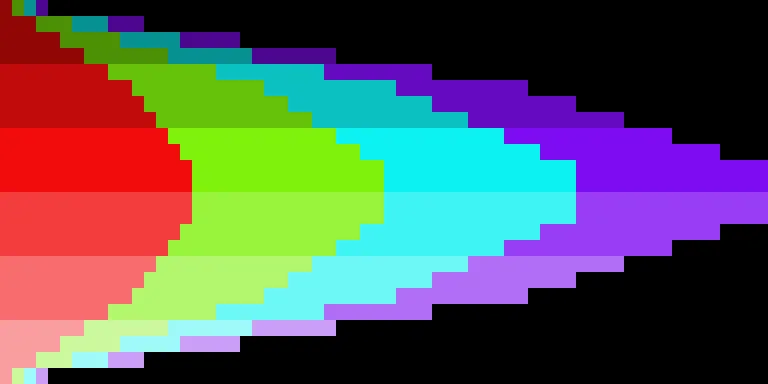
When the skybox image is stretched to full width, it becomes a lot clearer how the CLUTs are divided into zones:
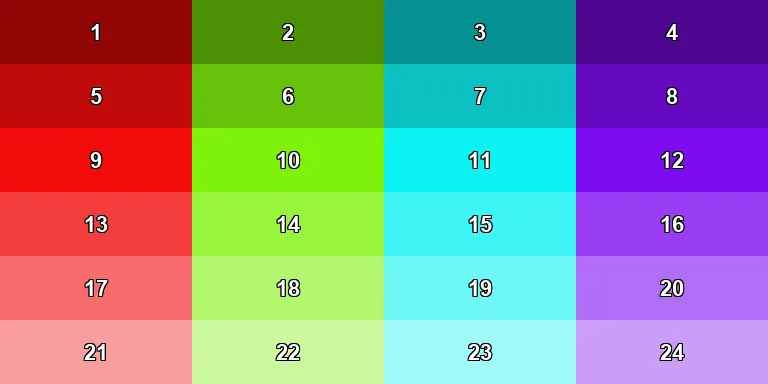
This results in 6 \* 4 = 24 CLUTs total, occupying VRAM rows 232-255.
The CLUT for any individual quad can be determined by the following formula:
short clutY = 232 + 4 * (band / 4) + (longitude / 12);Quad Data
Every quad has its own entry inside the SkyboxQuadData structure.
An entry is a 14 byte structure that describes which rectange to copy out of the packed texture, and what CLUT to apply to it:
| Offset(h) | Size | Type | Description |
|---|---|---|---|
| +0x00 | 2 | i16 | CLUT X (768) |
| +0x02 | 2 | i16 | CLUT Y (232-255) |
| +0x04 | 2 | i16 | Page X (640, 768, 896) |
| +0x06 | 2 | i16 | Page Y (256) |
| +0x08 | 2 | i16 | Texture X |
| +0x0A | 2 | i16 | Texture Y |
| +0x0C | 2 | i16 | Stride |
The entries are stored in a strict order: the first 48 entries are for the first band (the top), the next 48 are for the second band, and so on for all 24 bands.
The source rectangle copied for a quad is always stride texels wide and 16 texels tall, matching the fixed band height.
Here are the first 48 entries from the skybox quad data structure:
  CLUT X    CLUT Y    PAGE X    PAGE Y    TEXTURE X    TEXTURE Y    STRIDE
--------  --------  --------  --------  -----------  -----------  --------
*    768       232       640       256            0            0         1
     768       232       640       256            1            0         1
     768       232       640       256            2            0         1
     768       232       640       256            3            0         1
     768       232       640       256            4            0         1
     768       232       640       256            5            0         1
     768       232       640       256            6            0         1
     768       232       640       256            7            0         1
     768       232       640       256            8            0         1
     768       232       640       256            9            0         1
     768       232       640       256           10            0         1
     768       232       640       256           11            0         1
*    768       233       640       256           13            0         1
     768       233       640       256           14            0         1
     768       233       640       256           15            0         1
     768       233       640       256           16            0         1
     768       233       640       256           17            0         1
     768       233       640       256           18            0         1
     768       233       640       256           19            0         1
     768       233       640       256           20            0         1
     768       233       640       256           21            0         1
     768       233       640       256           22            0         1
     768       233       640       256           23            0         1
     768       233       640       256           24            0         1
*    768       234       640       256           26            0         1
     768       234       640       256           27            0         1
     768       234       640       256           28            0         1
     768       234       640       256           29            0         1
     768       234       640       256           30            0         1
     768       234       640       256           31            0         1
     768       234       640       256           32            0         1
     768       234       640       256           33            0         1
     768       234       640       256           34            0         1
     768       234       640       256           35            0         1
     768       234       640       256           36            0         1
     768       234       640       256           37            0         1
*    768       235       640       256           39            0         1
     768       235       640       256           40            0         1
     768       235       640       256           41            0         1
     768       235       640       256           42            0         1
     768       235       640       256           43            0         1
     768       235       640       256           44            0         1
     768       235       640       256           45            0         1
     768       235       640       256           46            0         1
     768       235       640       256           47            0         1
     768       235       640       256           48            0         1
     768       235       640       256           49            0         1
     768       235       640       256           50            0         1
The start of a section with a different CLUT is indicated by a * character for ease of
reading.
This entire table tells us how to construct the first band of the skybox:
- The first texture is a 1x16 rectangle located at (640, 256) in VRAM, and uses the first CLUT (768, 232).
- The second texture is a 1x16 rectangle located at (641, 256) in VRAM, and also uses the first CLUT (768, 232).
This goes on for all 48 segments in the band:

The second band, who's values immediately follow the first band's table, is constructed in the exact same manner. The only difference is that the stride is set to 3, resulting in all rectangles for this band being 3 texels wide instead of 1. Here are the first 5 entries from the second band:
  CLUT X    CLUT Y    PAGE X    PAGE Y    TEXTURE X    TEXTURE Y    STRIDE
--------  --------  --------  --------  -----------  -----------  --------
     768       232       640       256           52            0         3
     768       232       640       256           55            0         3
     768       232       640       256           58            0         3
     768       232       640       256           61            0         3
     768       232       640       256           64            0         3
     ...
Once we've constructed both bands, we can put them together to form the following image:

This continues until the fully constructed skybox is formed up above.