 KulaQuest Wiki
GGI Format
A custom binary format for storing global game assets.
This format is still under heavy research!
Overview
This format is used for storing all of the global, non theme-specific assets in the game:
- 3D model geometry for every in-game object
- Animation and lookup tables
- Sprite textures
There is only one of this file on disc, typically stored under the first level's path, and is loaded on startup. All values are in little endian, and the following primitive types will be used throughout this document:
| Encoding | Description |
|---|---|
| u8 | Unsigned 8-bit integer |
| i16 | Signed 16-bit integer |
| i32 | Signed 32-bit integer |
| string | C-style null-terminated |
Structure
struct GGIFile {
  Header header;
  EntityTable entityTable;
  ObjectTable objectTable;
  u8 modelData[];
  u8 hourglassAnim[];
  u8 depthCueLookup[];
  u8 _unknownSection[];
  string dummySection = "dummy!!!\r\n\r\n";
  u8 jumpAnim[];
  u8 spriteSheet[];
}
Header
struct Header {
  i32 spriteCountFruits;
  i32 spriteCountParticles;
  i32 spriteCountLensFlareAndMenuBackgrounds;
  i32 spriteCountTextElements;
  i32 spriteCountHiddenLevelParticles;
  i32 spriteCountBonusLevelWidgets;
  i32 rawOffsetHourglassAnim;
  i32 rawOffsetDepthCueLookup;
  i32 rawOffsetUnknown;
  i32 rawOffsetDummy;
  i32 rawOffsetJumpAnim;
  i32 rawOffsetSprites;
  i32 rawFileSize;
  i32 rawOffsetEntityTable;
  i32 rawOffsetObjectTable;
}
The first 6 values in the header pertain to different groups of sprites.
The 7 section offsets (include rawFileSize) form a half-delta encoded chain of values, anchored at 0x34:
// decoding the first 7 offsets
int abs[7];
abs[0] = raw[0] * 2 + 0x34;
for (int n = 1; n < 7; n++) {
  abs[n] = raw[n] * 2 + abs[n - 1];
}
The last 2 values, offsetEntityTable and offsetObjectTable, are encoded in a different manner:
// decoding the 2 table offsets
offsetEntityTable = ((rawOffsetEntityTable >> 2) + 0xD) * 4;
offsetObjectTable = ((rawOffsetObjectTable >> 2) + 0xD) * 4;
Model Table
The model table occupies the region from offset 0x03C to 0xE4B (0xE10 total bytes).
They are split into 2 contiguous sub-tables:
| Sub-table | Offset | Entry Count | Entry Size | Total Size |
|---|---|---|---|---|
| Entity table | 0x03C | 25 | 0x10 | 0x190 |
| Object table | 0x1CC | 50 | 0x40 | 0xC80 |
The order of the objects in the table is the same as the order of the objects from the object table, except the objects without variants are placed after the objects with variants. For an odd reason, despite there being 2 unknown level objects in the game between the capture pod and the captivator, the captivator precedes directly after the capture pod in the model table.
Entity Table
The entity table lists all balls and ememy objects, where each entry holds 3 level-of-detail (LOD) offsets, with the 1st being the highest quality, and the 3rd being the lowest quality. Not every model utilizes all 3 LODs, using the same offset for 2 or 3 LOD entries. All offsets in this table are relative to 0x3C (the start of the table):
// Entity Table - 0x190 bytes
struct EntityTable {
  EntityEntry worldBalls[10];
  EntityEntry bonusBalls[3];
  EntityEntry hiddenBall;
  EntityEntry _reserved0[6];
  EntityEntry slowStar;
  EntityEntry tire;
  EntityEntry fastStar;
  EntityEntry capturePod;
  EntityEntry captivator;
}

// Entity Entry - 0x10 bytes
struct EntityEntry {
  i32 lod1;            // highest quality
  i32 lod2;            // medium quality
  i32 lod3;            // lowest quality
  i32 _reserved = -1;  // 4th LOD in older versions (see version differences)
}
Object Table
The object table lists all the rest of the objects that contain models, with each entry supporting up to 4 different variants (e.g. different colors, states, ...) across the same 3 LODs. All offsets in this table are relative to 0x1CC (the start of the table):
// Object Table - 0xC80 bytes
struct ObjectTable {
  ObjectEntry _reserved0[5];
  ObjectEntry transporter;
  ObjectEntry _reserved1;
  ObjectEntry exit;
  ObjectEntry _reserved2;
  ObjectEntry button;
  ObjectEntry bouncePad;
  ObjectEntry movingSpikes;
  ObjectEntry spikes;
  ObjectEntry _reserved3[13];
  ObjectEntry hiddenExit;
  ObjectEntry fruitBowl;  // set to hourglass in later versions
  ObjectEntry arrow;
  ObjectEntry _reserved4[2];
  ObjectEntry key;
  ObjectEntry pillLethargy;
  ObjectEntry pillBounce;
  ObjectEntry pillInvincibility;
  ObjectEntry hourglass;
  ObjectEntry gem;
  ObjectEntry coin;
  ObjectEntry sunglasses;     // set to arrow in later versions
  ObjectEntry presentPurple;  // set to arrow in later versions
  ObjectEntry presentRed;     // set to arrow in later versions
  ObjectEntry presentYellow;  // set to arrow in later versions
  ObjectEntry unusedEnemy;
  ObjectEntry apple;
  ObjectEntry watermelon;
  ObjectEntry pumpkin;
  ObjectEntry banana;
  ObjectEntry strawberry;
  ObjectEntry presentBlue;   // set to arrow in later versions
  ObjectEntry presentGreen;  // set to arrow in later versions
}

// Object Entry with Variants - 0x40 bytes
struct ObjectEntry {
  VariantOffsets lod1;  // highest-quality variant offsets
  VariantOffsets lod2;  // medium-quality variant offsets
  VariantOffsets lod3;  // lowest-quality variant offsets
  i32 _reserved[4] = [-1, -1, -1, -1];
}

// Variant Offsets - 0x10 bytes
struct VariantOffsets {
  i32 variant1;
  i32 variant2;
  i32 variant3;
  i32 variant4;
}
Model Data
Each model blob immediately follows the model table and is referenced by an offset stored in the entity or object table.
struct ModelData {
  i16 _unknown0[4];
  i16 stpBlendOperator;
  i16 _unknown1;
  i32 _unknownType;           // 28 = ball, 24 = all other objects
  i32 vertexBufferOffset;     // relative from start of model data
  i32 vertexAttributeOffset;  // relative from start of model data
  <IF _unknownType IS 28>
    i32 vertexBuffer2Offset;  // relative from start of model data
  </IF>
  IndexBuffer indexBuffer;
  VertexBuffer vertexBuffer;
  VertexAttributeBuffer vertexAttributeBuffer;
  <IF _unknownType IS 28>
    VertexBuffer vertexBuffer2;
  </IF>
}
For an unknown reason, the ball models specifically contain a second vertex buffer after the vertex attribute buffer.
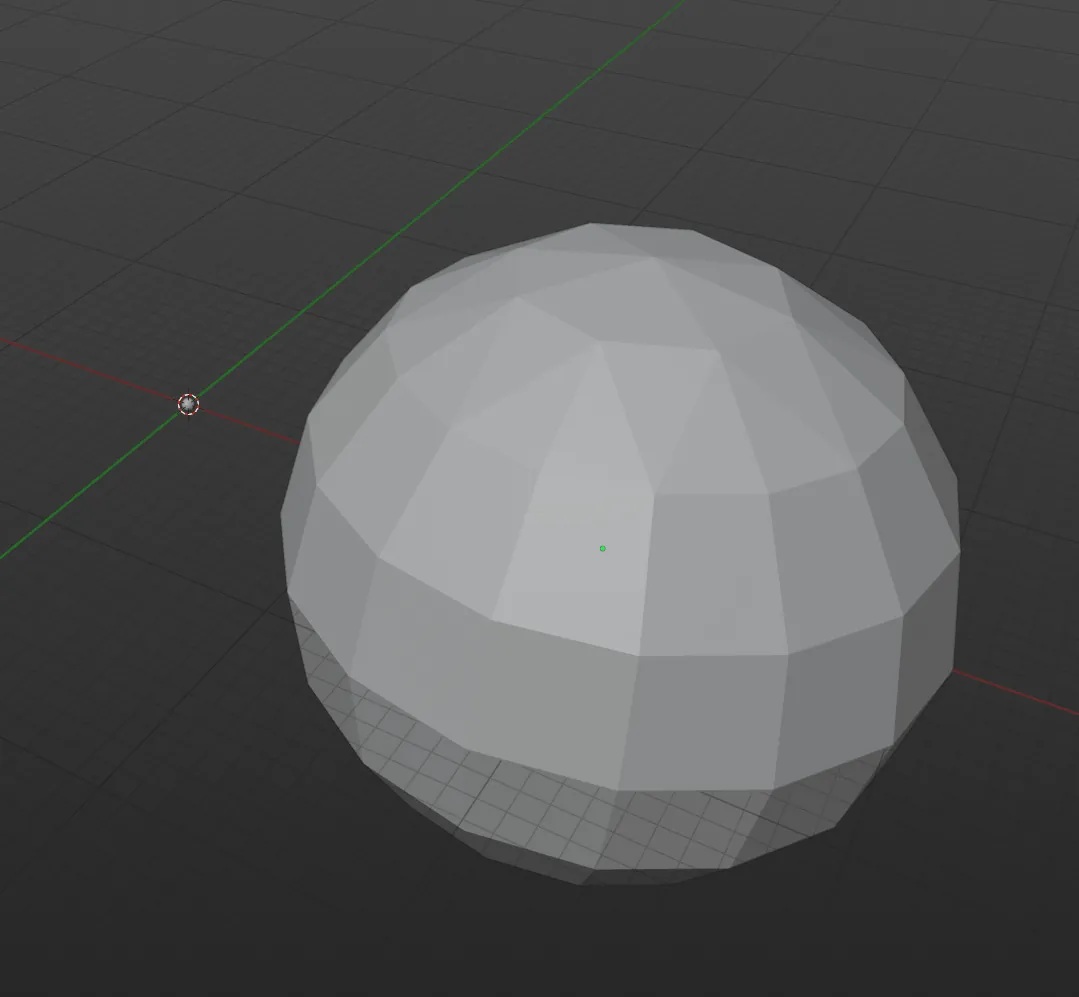
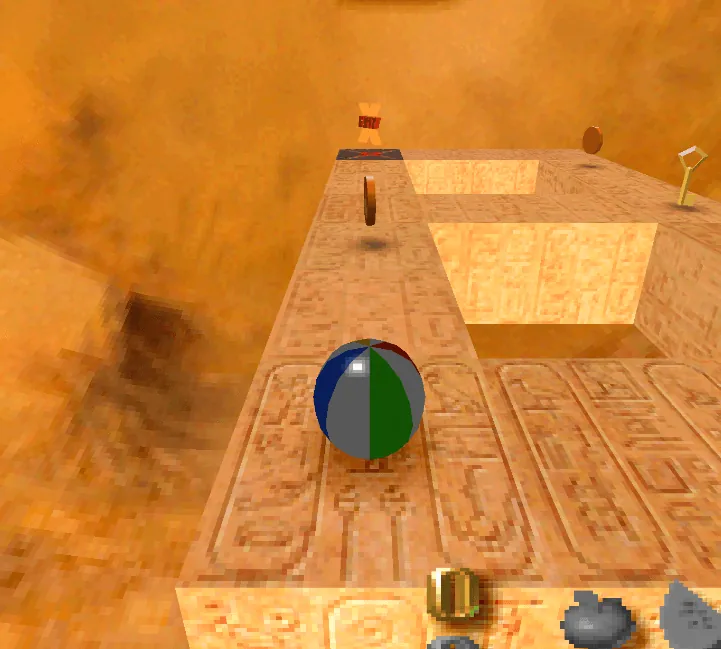
The second vertex buffer creates a significantly larger version of the original model, as seen on the right. Upon completely nullifying this extra section, the model becomes darker in game, suggesting that this extra buffer may have something to do with lighting:
Index Buffer
struct IndexBuffer {
  IndexRecord primitives[];  // (vertexBufferOffset - 32) / 4 records
  i32 _trailer0 = 1;
  i32 _trailer1 = 0;
}

// Index Record - 0x04 bytes
struct IndexRecord {
  u8 a;  // vertex group index for corner A
  u8 b;  // vertex group index for corner B
  u8 c;  // vertex group index for corner C
  u8 d;  // vertex group index for corner D (quads only; set to 0 for triangles)
}
Vertex Buffer
Vertices are stored in groups of 3, with the X/Y coordinates of each vertex in the group interleaved before the Z coordinates. One sentinel group (0xFF x 20) terminates the buffer.
struct VertexBuffer {
  i32 frameCount;
  i32 frameSize;
  VertexGroup frames[frameCount][frameSize];
}

// Vertex Group - 0x14 bytes
struct VertexGroup {
  i16 x0, y0;      // XY of vertex 0
  i16 x1, y1;      // XY of vertex 1
  i16 x2, y2;      // XY of vertex 2
  i16 z0, z1, z2;  // Z of vertices 0, 1, 2
  i16 _padding;    // always 0
}
Vertex Attribute Buffer
Each primitive consumes 4 records (all 4 used for quads; 3 used + 1 padding for triangles).
struct VertexAttributeBuffer {
  i32 _unconfirmedCount = 1;
  i32 dataSize;
  VertexAttribute attributes[dataSize / 4];
}

// Vertex Attribute - 0x04 bytes
struct VertexAttribute {
  u8 r;         // special case here (see below)
  u8 g;
  u8 b;
  u8 primFlag;  // non-zero for the first record of a primitive; see table below
}
Important: If the r value is an even number, the face will be rendererd on both sides.
This is used on the apple for example, to make the stem visible from all angles.
The first record of each primitive carries a non-zero primFlag identifying different options for the primitive; all subsequent records have this value set to 0.
| Flag Bit | Description |
|---|---|
| 0 | Unused (0) |
| 1 | Unused (0) |
| 2 | Always set |
| 3 | Connected |
| 4 | Type (0=Triangle, 1=Quad) |
| 5 | Unused (0) |
| 6 | Transparent |
| 7 | Unused (0) |
Hourglass Animation
There is a section the immediately follows the model data that contains hourglass flip animation data that is 0x780 bytes long. This animation data is the exact same across all known GGI files.
Depth Cue Lookup Table
This section immediately follows the hourglass animation data, and contains 4096 16-bit values. It provides a non-linear mapping from camera angle components to lighting weight, simulating directional ambient light that changes based on the camera's orientation.
Unknown Section
This section is very similar to the depth cue lookup table, also consisting of 4096 16-bit values. However, it does not seem to be referenced in any version of the game, and is the same across all known GGI files.
Dummy Section
For an unknown reason, this section just contains the text, "dummy!!!\r\n\r\n".
Jump Animation
This section contains position data for the jump animation, including the arc of the ball during a forward jump. Each short position value offsets the ball in that relative direction.
struct JumpAnimation {
  i16 frameCount;
  i16 _padding[3] = [0, 0, 0];
  AnimationFrame frames[frameCount - 1];
  i16 endPadding[];  // used for alignment and in-place jump return (see below)
}

struct AnimationFrame {
  i16 vz;      // displacement on gravity axis (positive = up)
  i16 vx = 0;  // displacement on right axis (rightVec)
  i16 vy;      // displacement on negative facing axis (negative = forward)
}
This section holds a pre-baked jump arc; a sequence of absolute displacement vectors, one per game frame. This helps save CPU by not having to calculate the ball's 3D arc during a jump on the fly.
For forward jumps, the game applies the (z, x, y) values directly to the jump's starting coordinate as absolute offsets.
Once the animation ends, it stops reading the table and snaps the ball exactly 2 blocks forward for perfect alignment.
To save memory, the game reuses the same data for in-place jumps as well, calculating the vertical velocity frame-by-frame by subtracting the current z position from the next frame's z position (delta_z = next_z - current_z).
The end padding serves 2 purposes, and there must be at least 1:
- It provides a
z = 0value for the final frame of the in-place jump delta, ensuring the ball returns back onto the floor to its normal height. - It pads the total chunk size to a multiple of 4 bytes for alignment purposes. There may be more than one for proper alignment.
Here's an example of the first and last 4 frames of animation from Kula World:
| Frame | Height Offset (vz) | Side Offset (vx) | Forward Offset (vy) |
|---|---|---|---|
| 1 | 0 | 0 | -48 |
| 2 | 61 | 0 | -96 |
| 3 | 117 | 0 | -142 |
| 4 | 168 | 0 | -188 |
| ... | ... | ... | ... |
| 24 | 203 | 0 | -941 |
| 25 | 158 | 0 | -969 |
| 26 | 110 | 0 | -997 |
| 27 | 56 | 0 | -1024 |
This section was updated for the Roll Away release, with the animation lasting longer and going slightly into the floor upon landing, which is why the floor clip glitch exists in this version.
Sprites
struct SpriteSheet {
  i32 count;
  Sprite sprites[count];
}

struct Sprite {
  i16 bpp;
  i16 stpBlendOperator;
  SpriteCLUT clut;
  SpriteTextureData textureData;
}

struct SpriteCLUT {
  i16 vramX;
  i16 vramY;
  i16 reuseClut;
  i16 padding = 0;
  <IF NOT reuseClut AND bpp IS NOT 16>
    i16 data[bpp == 8 ? 256 : 16];
  </IF>
}

struct SpriteTextureData {
  i16 vramX;
  i16 vramY;
  i16 width;  // actual width, not in framebuffer pixels
  i16 height;
  <IF bpp IS 16>
    i16 data[width * height];
  <ELSE>
    u8 data[bpp == 8 ? (width * height) : (width * height) / 2];
  </IF>
}
After each sprite's texture data, there may be extra bytes (which some contain garbage data) to align to the 4 byte boundary.
When a sprite uses 16 bits per pixel, each pixel is represented directly using 16 bit color instead of a color lookup table (CLUT), and therefore the values for the its clut field are set to -1 (different in the earliest demo, see below).
The only sprite that uses this bit depth is a 2x1 completely white sprite, and its current use in game is unknown.
Unique to only the earliest version of the game, the 4 CLUT values for a 16-bit sprite are not included.
Version Differences
In the first two demo versions, a 4th LOD value is utilized in the entity table. It's also worth noting that the these two versions use the same model for all 4 levels-of-detail for entity models.
Alpha Version
In the earliest demo version, the entire format is compressed using the lzrw3a, the same compression algorithm used in .KUB files. Once uncompressed, the format has the following differences:
- There are only 3 sprite count values instead of 6. The 3rd count pertains to only the lens flare sprites, as the menu background images had not yet existed.
- A value of
0xAis used instead of0xDwhen decoding the two table offsets at the end of the header:
// decoding the 2 table offsets (first demo version)
offsetEntityTable = ((rawOffsetEntityTable >> 2) + 0xA) * 4;  // entity table is at offset 0x30
offsetObjectTable = ((rawOffsetObjectTable >> 2) + 0xA) * 4; // object table is at offset 0xE0- Balls do not contain a second vertex buffer in this version. This may be a factor in why you're able to replace the ball model with the slow star model without crashing the game.
- The 4 CLUT values for a 16-bit sprite are not included. Thus, the texture data immediately follows after the bpp and blend operator values.
Beta Version
This version's format is pretty similar to the modern format, with only slight differences:
- There are only 5 sprite count values instead of 6.
- A value of
0xCis used instead of0xDwhen decoding the two table offsets at the end of the header:
// decoding the 2 table offsets (second demo version)
offsetEntityTable = ((rawOffsetEntityTable >> 2) + 0xC) * 4;  // entity table is at offset 0x38
offsetObjectTable = ((rawOffsetObjectTable >> 2) + 0xC) * 4;  // object table is at offset 0x1C8